


Smart Thermostats Installation in Metro West, FL



Keeping your home comfortable while controlling energy costs is a common challenge in Metro West, FL. Smart thermostats are one of the most effective upgrades for managing comfort, humidity, and running time of your HVAC system without changing daily habits. Van Eddies Heating & Air Conditioning provides professional smart thermostat installation services tailored to Metro West homes, ensuring compatibility with your existing equipment, secure Wi Fi setup, and on-site training so you and your household can start saving energy and staying comfortable right away.
Why a smart thermostat matters for Metro West, FL homes
Metro West experiences long, humid summers and mild winters, which means air conditioning is a primary driver of energy use for most of the year. A smart thermostat helps reduce wasted cooling runtime by adapting schedules, using occupancy sensing and geofencing, and optimizing compressor cycles to reduce moisture problems. Better control of setpoints and fan operation also helps with indoor humidity, preventing the clammy feeling common in Florida homes. For homes with heat pumps, smart thermostats can manage defrost cycles and balance auxiliary heat use to reduce unnecessary energy consumption. In short, a properly installed smart thermostat makes your existing system more responsive to real life in Metro West.
Types of smart thermostats and the benefits they offer
Smart thermostats are not all the same. Understanding the main categories helps you choose the right unit for your home and goals.
- Programmable smart thermostats
- Use scheduled setpoints for different times of day
- Save energy by reducing conditioning when the home is empty
- Good for predictable routines and families with regular schedules
- Learning thermostats
- Automatically create schedules based on observed behavior
- Adapt to seasonal needs and sensor feedback
- Ideal for households that prefer automated management with minimal setup
- Remote sensor enabled thermostats
- Allow temperature and occupancy sensing in rooms away from the main thermostat
- Reduce hot or cold spots and improve comfort in multi-room homes
- Compatibility and integration models
- Models that work with heat pumps, multi-stage systems, communicating controls, or ductless mini-splits
- Units that integrate with home automation platforms, voice assistants, and energy reports
Key benefits for Metro West homes:
- Reduced cooling runtime and energy cost
- Better humidity control through tailored fan and compressor cycles
- Remote control for pre cooling before returning home
- Energy usage insights to change habits that drive bills
- Potential compatibility with utility programs and rebates where available
Compatibility check: what we evaluate before installation
A successful smart thermostat installation starts with a thorough compatibility check. Van Eddies Heating & Air Conditioning technicians inspect your system to confirm the thermostat will work with your equipment.
We check:
- System type: conventional split system, heat pump, furnace, ductless mini-split, or packaged unit.
- Control voltage: most smart thermostats require a 24 volt control circuit. Line voltage furnaces or older electric systems need special solutions.
- Wiring: presence of a common wire or C-wire, and the condition of existing thermostat wires.
- Staging and communicating systems: single stage, multi-stage compressors, or communicating manufacturer-specific systems that require a matching control interface.
- Additional controls: humidifier, dehumidifier, whole house fan, ventilator, or zone control panel integration.
- HVAC age and control board configuration: older systems with worn relays or nonstandard wiring may need an interface module or a control replacement.
Common outcomes after a compatibility check:
- Direct replacement: standard 24V wiring is compatible and ready.
- C-wire required: add a C-wire, use a power extender kit, or install an adapter.
- Communicating system: recommend a thermostat designed for your brand or keep factory controller and add a compatible interface.
- Ductless systems: verify whether the mini-split supports aftermarket thermostats or needs a manufacturer controller.
Step-by-step installation and wiring process
Professional installation ensures reliable operation and preserves warranty on both the thermostat and HVAC equipment. Below is the typical step-by-step installation sequence used by trained technicians.
Pre-installation assessment
- Confirm model selection and compatibility
- Note wiring colors and label each conductor
- Photograph existing wiring for records
Safety first
- Turn off power to the HVAC system at the breaker and at the equipment service switch
- Verify power is off with a meter
Remove old thermostat
- Detach faceplate and disconnect wires carefully
- Label wires and confirm terminal assignments
Mounting and wiring the new thermostat
- Mount the new baseplate level on the wall
- Pull wires through the base and connect to correct terminals
- Install C-wire or Power Extender Kit if needed
- For systems with multiple stages or accessories, connect dedicated terminals as required
Reconnect power and equipment verification
- Restore power and verify the furnace, air handler, heat pump, or compressor responds to the thermostat
- Test heating and cooling cycles in single-stage and multi-stage modes
- Confirm fan control and accessory operations such as humidifier or air cleaner
Configure advanced settings
- Set system type in thermostat menu (heat pump vs conventional)
- Configure setback limits, swing range, pump delay, and staging if applicable
- Set sensor type and calibration if remote sensors are present
Final checks and documentation
- Confirm thermostat mounts flush and wires are secure
- Record wiring diagram and settings
- Provide homeowner with summary of configuration and app login basics
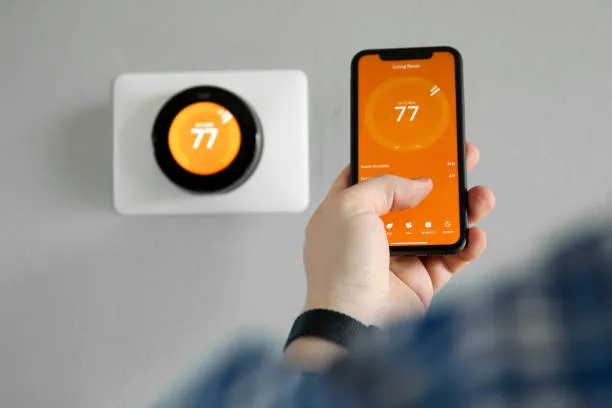
Wi Fi setup and app configuration
Wireless setup connects your thermostat with your smartphone, enabling remote control, alerts, and energy reports. Many installation problems are related to networking, so technicians follow a reliable process.
Wi Fi and app steps:
- Verify router and network: most thermostats need a 2.4 GHz Wi Fi connection; confirm SSID and password
- Put the thermostat in pairing mode and follow on-screen prompts to select the home network
- Create or connect to the required account in the thermostat manufacturer app
- Update the thermostat firmware to the latest version for security and feature support
- Configure geofencing, schedules, and notifications in the app
- Integrate with voice assistants or home automation hubs if desired
- Set up user accounts and permissions for family members
Network tips for Metro West homes:
- Many residences use combined 2.4 GHz and 5 GHz networks; ensure your router broadcasts a 2.4 GHz SSID or enable band steering compatibility
- If Wi Fi is weak at the thermostat location, a mesh Wi Fi node or range extender can stabilize the connection
- Secure the app account with a strong unique password and enable two factor authentication when available
Energy savings potential and real world examples
Smart thermostats offer measurable savings, but actual results depend on home characteristics and occupant behavior. Typical industry outcomes show energy reductions vary by system and use, with common ranges as follows:
- Cooling savings: 10 to 20 percent for many homes when the thermostat is used to reduce runtime during absences and to prevent overcooling.
- Heating savings: 8 to 15 percent where heating is a significant portion of utility use.
- Additional savings through humidity management: Reduced dehumidification runtime translates to less compressor runtime and lower bills in high humidity climates like Metro West.
Example scenario for a Metro West household:
- Homeowner normally keeps AC at 72 F while away for 8 hours a day. With a smart thermostat schedule and geofencing, the setpoint moves to 78 F when away, then pre cools 20 minutes before arrival. The system reduces compressor runtime by shortening cycles during unoccupied hours and prevents overcooling while the house is empty. Over a summer season, this behavior could result in noticeable savings on electric bills.
Factors that influence savings:
- SEER of the air conditioner: higher SEER yields proportionally lower running costs
- Home envelope: insulation, windows and duct leakage affect how fast the house gains or loses heat
- Occupant behavior: savings are amplified when automated features are utilized consistently
- Local electricity rates and utility incentives: some programs reward reduced peak usage
Post-installation support and homeowner training
Installation is only part of the project. A successful upgrade includes training and support so homeowners use the thermostat effectively.
Training and support highlights:
- Personalized app walkthrough and schedule creation based on daily routines
- Explanation of modes: heat, cool, auto changeover, fan auto/on, emergency heat for heat pump systems
- Demonstration of geofencing, vacation mode, and learning features
- Setting energy report preferences and threshold alerts for high usage
- Troubleshooting tips for Wi Fi loss or app connection issues
- Guidance on sensor placement and interpretation of sensor readings
- Recommendations for seasonal adjustments and humidity settings in Metro West to balance comfort and efficiency
Van Eddies Heating & Air Conditioning documents settings and leaves homeowners with clear instructions and reference materials. Ongoing support for connectivity and thermostat behavior is available as part of post-install service.
Common installation and operational issues and how we resolve them
Smart thermostat installations can encounter certain common problems. Early diagnosis and professional fixes prevent repeated service calls.
Problem: No C-wire detected
- Symptom: Thermostat powers off randomly or fails to power on
- Resolution: Install a C-wire from the air handler, use a power adapter, or install a Power Extender Kit that uses existing wires to provide continuous power
Problem: Wi Fi connectivity drops
- Symptom: Thermostat loses remote control or stops reporting data
- Resolution: Move router or add a mesh node, switch to 2.4 GHz network, update firmware, and verify network security settings
Problem: System short cycles after installation
- Symptom: Short on/off cycles and poor comfort
- Resolution: Adjust differential and cycle settings, verify correct equipment wiring and configuration for multi-stage systems, and check thermostat location for false readings
Problem: Thermostat not compatible with communicating controls
- Symptom: Installing a standard thermostat does not control system properly
- Resolution: Recommend compatible communicating thermostat, or maintain factory control board and add a compatible interface if available
Problem: Inaccurate temperature readings
- Symptom: Room feels much warmer or cooler than thermostat indicates
- Resolution: Relocate thermostat or add remote sensors, avoid placing thermostat near direct sunlight, appliances, or ventilation that cause false readings
Problem: Heat pump and auxiliary heat mismanagement
- Symptom: Auxiliary heat cycles too often, increasing costs
- Resolution: Configure changeover settings, differential, and lockout temperatures to ensure auxiliary heat engages only when necessary
When to upgrade your whole HVAC system instead of just the thermostat
A smart thermostat makes sense when your existing system is functional and has compatible controls. There are situations where upgrading the thermostat is only a temporary fix and a whole equipment upgrade is more cost effective.
Consider an HVAC replacement if:
- The air conditioner or heat pump is failing frequently, has low efficiency, or needs large repairs
- The system uses nonstandard or line voltage controls incompatible with smart thermostats
- Extensive ductwork leakage or poor airflow undermines thermostat-based control
- Communicating systems are proprietary and require matched controls that a generic smart thermostat cannot provide
- Home energy goals include major efficiency upgrades and long term operating cost reductions
Van Eddies Heating & Air Conditioning can evaluate your system and advise whether a smart thermostat alone will deliver the results you expect, or if a system replacement will yield better long term savings and comfort.
Maintenance and best practices after installation
To keep your smart thermostat and HVAC system performing well, follow these maintenance best practices.
- Keep firmware and app software up to date to benefit from feature improvements and security updates
- Replace HVAC filters regularly to keep airflow steady, which helps temperature control and prevents unnecessary compressor cycles
- Avoid placing heat producing appliances, direct sunlight, or drafts near the thermostat
- Use remote sensors in large or multi level homes to eliminate hot and cold spots
- Revisit schedules seasonally to match changing occupancy patterns and local climate shifts
- Check battery levels if the thermostat has battery backup and replace batteries as recommended
- Periodically review energy reports and adjust setpoints to tune savings versus comfort
Why choose Van Eddies Heating & Air Conditioning for smart thermostat installation in Metro West, FL
Van Eddies Heating & Air Conditioning brings local knowledge and experienced technicians to every smart thermostat project. With a history of serving Metro West and the greater Orlando area since 1999, our technicians understand the specific comfort and humidity challenges of Florida homes. We approach each installation with a thorough compatibility check, clean wiring practices, secure Wi Fi configuration, and practical homeowner training.
What sets this service apart:
- Local experience with Florida heat, humidity, and common system types used in Metro West homes
- Technicians trained in both traditional 24 volt systems and more advanced communicating and heat pump controls
- Focus on proper wiring and power solutions so the thermostat remains reliable over time
- Post-install support and owner training so occupants use the system effectively for comfort and savings
- Attention to accessory integration such as humidifiers, whole house dehumidifiers, and zoning systems
Maintenance Plan
Heat Pump/ AC Tune-Up

Furnace Tune-Up
Customer Testimonials